StampznewBright

  • Subscribe to our RSS feed.
  • Twitter
  • StumbleUpon
  • Reddit
  • Facebook
  • Digg
Showing posts with label Squigglefly. Show all posts

Thursday, 10 November 2011

knotty Willow tree cards

Posted on 21:30 by Unknown

Trying to work on my stash of everyday cards
(and aiming to send more happy mail), so
here are two "just saying hi" type cards:

An A2 card
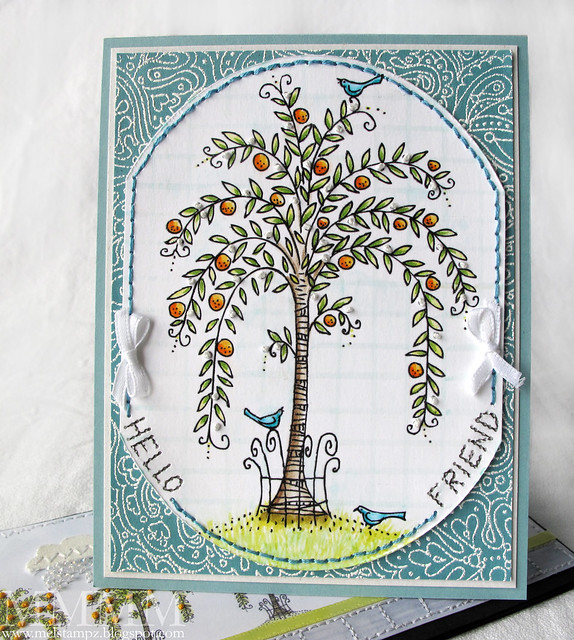
5 Willow Squigglefly card mel stampz

and a long & low one:

1 Willow Squigglefly card mel stampz

Both were made with this
Willow digital image

from Squigglefly by Rich Davis
(Something I bought quite a while ago).

The first card, a simple A2 card, has the tree image on a large oval with
the sides cut off, to get something a little different shape to it:

5 Willow Squigglefly card mel stampz

The background stamp is Impression Obsession's
Funky Background heat embossed in white.

The image is heat embossed from an ink jet printer on
Paris Bleedproof cardstock
& coloured with Copics:

6 Print & emboss - Cut oval slice sides off- Make a grid background & Colour image

Instead of colouring a sky, I just did a grid using light colours with a ruler.
Then coloured in the oranges, leaves & cute birdies...

7 faux stitching- Pencil in & pierce sentiment

The sentiment is faux-stitched. I drew it on with pencil, pierced holes
and coloured in stitches with a fine-tipped permanent black marker.

8 white embroidery knots on Willow Squigglefly img mel stampz

Then added knots of white thread on the tree.


The second card came about because the Willow tree
reminds me of a Paris street, for some reason, so I thought
I'd repeat the digi several times:

1 Willow Squigglefly card mel stampz

(I erased the little birdies from the image to simplify it a little bit)
and added knotty oranges:

2 knotty oranges

...a stitched sidewalk and some clouds...

stitched cloth clouds & bead rain

...with beaded rain.

and

(button backed sentiments):


The ribbon was white, but now it's coloured with a
Copic marker (Mimosa Yellow YG00):

embellished clear button

The matching sentiment was made this way:

1) Type up a computer sentiment using a font you like.

2) Change the colour of the font to suit your project.

3) Print it out and punch it out (with one was punches with a 3/4" circle punch).

4) Pierce and stitch around the outer edge of the circle.

5) Colour the edge with marker or what have you (This one is coloured with Copics to match the ribbon).

6) Finally, glue the paper circle onto a clear button (or any button).


And that's all folks!

Hope you're having a lovely lovely week,
Read More
Posted in cheap-tricks, Digital-Images, Squigglefly | No comments

Friday, 26 February 2010

Babushka-Doll-shaped Swing Card

Posted on 00:02 by Unknown
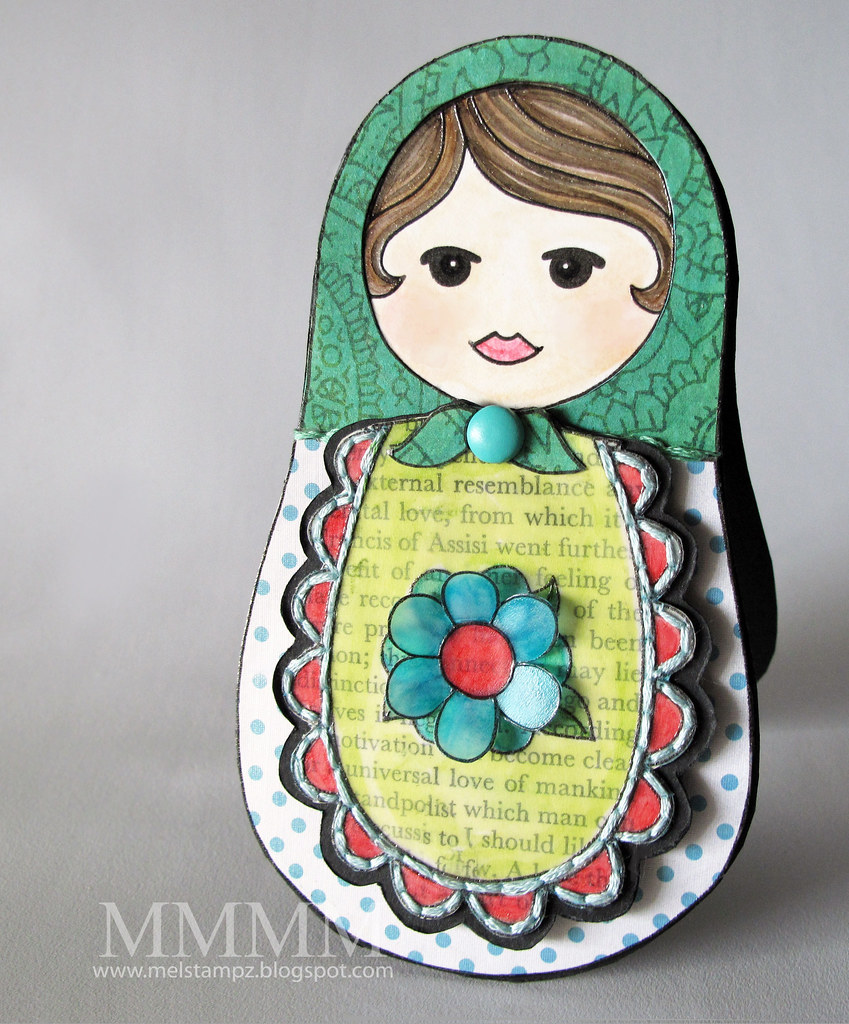
This Babushka doll has some news for her husband...

Squigglefly Babushka Matrushka Momma melstampz

...She's expecting a...

Squigglefly OPEN Babushka Matrushka Baby melstampz

...baby Babushka!
(and no, Honey, this is not my way of trying to tell you something...heeheehee) ;o)


the Babushka Doll is a digital image

(from Squigglefly
)


...make this Babushka Swing card:


  • Digital Image: Babushka doll from Squigglefly
  • SRM's Quick Cards Baby Girl #52002
  • Inkjet printer, Vellum cardstock, clear embossing powder, heat gun
  • Neenah Classic Crest Solar white cardstock, matte medium
  • Dotted paper is (GCD Party it Up collection)
  • Copic markers, Book paper
  • Paper piercer, needle, & green & turquoise embroidery thread
  • Large BasicGrey brad,

making the basic shape & colouring her head:


A) Erase the flower--digitally--from the apron of the Squigglefly Olga Babushka Doll. (I used Photoshop to erase it.)

B) Print & emboss the doll 2 times on White cardstock (Once, for the face & the main shape & once for the apron bit.) To emboss it, I treated the paper with Matte Medium (Embossing note: this does change the way the paper takes Copic markers; it's quite different feel, but I like the digital embossing so much.

C) Colour the face & hair & cut the doll & the apron bit out.

a note on cutting (in other words, what I messed up here) ;o): In the photo above I cut out the apron & set it aside for later (to save paper) but in hindsight I would have just printed two of the dolls (with the flowers erased) and used one as a solid background (not cut) and one as the plain apron piece--since that would make it easier to work with. Clear as mud? ;o)


To make her look like a happy pregnant lady, I added a bit of Copic multiliner to her mouth (the aim was to make the corners of her mouth seem like they were going up in a bit of a Mona Lisa smile):

Mommy Matrushka Smile Squigglefly digi mel_stampz

I coloured her hair with these 3 Copic markers: E71Champagne, E44 Clay, & Warm Gray No-7 and her skin with E50 Eggshell, E00 Skin White, & Sugared almond pink RV02.

making the apron:


A) Print one of the the Babushka Dolls (I chose Olga) onto vellum cardstock, emboss the wet inkjet printer ink with clear embossing powder & heat gun it gently to melt the powder. Adhere the embossed vellum to book paper & cut it out.


B)
Adhere it to black cardstock & cut it out (leaving a bit of a black border)


C) Pierce around the scallop of the apron with a paper piercer, colour the vellum & stitch it with embroidery thread. Pierce a hole in the knot of the Babushka's scarf (for a brad later.)


Paper piecing

This is super easy since the shapes of this doll are so nice & simple, but of course you'll
just be sure to print your pieces using the same scale for all the pieces. :o)


A) Print the doll again to get the dotted patterned bottom--the dotted paper used here is from the GCD Party it Up collection. Like, vellum it lets you emboss from the printer because of the non-porous (metallic) finish.


B) Print the scarf (on patterned paper & cut it out) Cheap Trick: Want your paper bits another colour? Copic markers will do the trick. I used two Copic colours to match the BasicGrey brad: YG23 New Leaf & Aqua BG15.

(Sorry, can't for the life of me find the name of this paper. It has colourful orange/blue/green leaves on the other side.)

Adding the swinging apron
(and a baby Babushka):


Step 1) Colour the scallops on the dotted apron.


Step 2) Print & colour a teeny version of the doll (as a wee baby to match Mommy.) Cut the baby image out.


Step 3) Adhere baby the white cardstock apron bit (with the scallops cut off) Stick some SRM sentiment stickers onto it. (These are from SRM's Quick Cards Baby Girl #52002)


Step 4) Adhere baby in the Matrushka-Babushka Mommy's Tummy--so it will show from under the swinging apron.


Step 5) Cut the scarf into three pieces & Adhere the two scarf ends to the vellum apron section. If you don't have a matching brad, you can make one by gluing the paper-pieced center knot of the scarf onto any brad you have. I just discarded it, since the BasicGrey brad matched.


Step 6) Use a brad to attach the apron...


....so that it swings open...


and you can see the itty bitty baby Babushka in her tummy!

Step 7) Add an extra 3D flower:


(this one is embossed on vellum & coloured with Copics)

Making the card base:


Make a Babushka shaped card:

A) Fold a piece of cardstock (I used a standard piece of black cardstock folded on the diagonal to get it long enough.)

B) Trace the Babushka shape onto it (making sure it overlaps a little to keep a fold intact in the card (at the top, or wherever you prefer.)

C) Cut it out and...

...then mount the Babushka on the front of the card:

...and there she is...

these are click-able Blogger photos (to enlarge)


Thank You so much for taking time to visit;
hope you
have an amazing day!


(click to visit the blog from an email or reader)
Read More
Posted in Digital-Images, Faves, Squigglefly, techniques, Tutorials | No comments

Monday, 22 February 2010

Caardvarks SRM sticker tutorial & Squigglefly pears

Posted on 21:10 by Unknown


Another card for the Caardvarks SRM sticker challenge...

Caardvarks SRM stickers mel stampz

I'm calling this a technique a "vellum sticker-sentiment collage" (since you could collage all kinds of phrases & things under the vellum image...and/or stamp...) but secretly I think I just like to say the big fancy word "collage." ;O) It's really just sticking some sentiment stickers on cardstock & adding a reverse-coloured vellum image over it. LOL.

The Squigglefly Pears image is heat embossed on vellum cardstock, out of an inkjet printer (just print, sprinkle on clear embossing powder, & heat set with a heat gun):

kisses

and the SRM sentiment stickers show through the vellum.


1... Caardvarks sticker Challenge & SRM stickers links
2...Image used here (Squigglefly Pears!)
3...How to make a vellum sticker collage with a speedily embossed digital image

-1-


Have you seen the crew cards & the entries for the
latest Caardvarks Challenge? Gorgeous stuff!

See it all here at...

(Sticker Challenge!) Hope you can play with us!
&
Links for the SRM stickers...


Click to visit the SRM store
or
The SRM Design Team blog

-1-


When I saw this image I knew i hadda buy it.

Am I completely crazy, or do the two pears on the left look like a couple of smoochy
people in love? (I think the pair of pears on the right might be jealous--or just married for a long time. hehehe) ;O)


Squigglefly Pears (digital image)

I've always wanted to colour me some bright green pears.
Pears are oddly nostalgic for me. We had pear trees growing up. I used to stash some pears I'd picked under my pillow & in my embroidery basket--for some weird reason. It wasn't pretty when I forgot them there (as you can well imagine.) I really love pears. Unripe ones especially. Do you like pears? Got any unusual fruit memories?


...make a vellum sticker collage
(with a speedily embossed digital image)


  • Squigglefly Pears (digital image) printed on Heavyweight vellum
  • ...with inkjet printer ink, clear embossing powder & heat gun
  • Neenah Classic Crest Solar White 100#
  • Black Pop Tones 100lb cardstock from MFT
  • Glue Glider Pro adhesive gun & Tombow monomulti
  • Paper piercer, needle & black thread
  • Copic markers
  • May Arts ribbon--double faced satin HA66

You can click these photos for a closer look, if you like:


Step 1) Heat emboss the digital image from an inkjet printer. Print Squigglefly Pears digital image on vellum cardstock. Sprinkle clear e.p. on wet inkjet printer in & use heat-gun to melt it.


Step 2) Trim the image, flip it over & colour on the back unembossed side of the vellum with Copic markers (or your choice of colouring medium for vellum.)

Copic colours used here: YG11 Mignonette, YG23 New Leaf, Yellowish Green YG06, YG67 Moss, and to make the bride & groom pair of pears blush: R35 Coral (Here comes the Blushing Bride Blushing Bartlet, giggle giggle)

For the brownish-gray base, I used Warm Gray W-7 allover, with shadows of Black 100, & cool gray C-7


Step 3) Tape the image to a window or light box--in order to add the stickers under the image--vellum side facing you--for the collage look (and get them placed just so...)


Step 4) Next tape up your cardstock over it (this layer will end up under the vellum image when it's all put onto your card.) While the cardstock is on the window, atop the vellum, adhere the stickers to the cardstock--in the places where you want them to show through the vellum.

I've used white cardstock to try and make the colours pop, but you could use any colour or pattern you like, of course.


Step 5) Line the image & sentiments up: Place the vellum image over the SRM sticker sentiment "collage" (no adhesive yet at this point) & trim or mark it according to how you want it to sit.


Step 6) Adhere the embossed vellum image over top of the SRM stickers (embossed side up with the colouring on the back.) I like a VERY thin application of tombow monomulti, mostly because it's what I have on hand & it seems to disappear fairly well under the vellum.


Step 7) Pierce around the image to make holes for easy hand sewing (or faux sewing) (As an afterthought, I decided to add more piercing to this later for a more distressed stitching look, as you can see in the next photo...)


Step 8) Stitch the image with black thread (extra distressed style) ;o)


Step 9) Distress the cardstock edges (using the edge of your scissors, your fingernails, or a distressing tool.


Step 10) Add inky distressing with a Copic marker. This is Warm Gray no 1 (very lightly applied.)


Step 11) Adhere a strip of green satin may arts ribbon to a black standard A2 sized card & then stick the sticker collage pear image on.


Step 12) Create an SRM sticker sentiment frame. This one is very distressed (on purpose) ;o) The SRM "mr. & mrs." sticker is trimmed to fit-then pasted on paper (stamped with words & acrylic painted.) Sticker corners roughed up like crazy & a little bit of stazon ink (a very very little bit of black Stazon ink on a finger tip) is rubbed here & there.


Step 13) Stitch black crystal beads to cover the holes of the hardware frame & embellish it. (This was a cream metal frame-but now it's covered with black stazon & silver zigpainty pen)

Step 14) Finally, Make a bow & add it to the card with the sticker sentiment frame:


(click-able Blogger photo)

Last but not least, the bow was made with a tool called a Bow Easy. Thanks to my fantabulously sweet & generous friend Dawn. She surprised me & sent me one with this stunning creation---and I'm in bow heaven now! Thank You Dawn!!! You sure are a darlin'! Mwah!

Never tried a Bow Easy? You won't believe it. Here's a video or two:

Suzanne's perfect Bow Easy video tutorial (so easy to follow)

Gina's great video tutorial on the bow easy with a cool double-looped bow & a nifty trick using thread


Thanks for stopping in!


(click to visit the blog from an email or reader)

P.S. Moving & Blogging....All the packing is a tad nerve-wracking, but we're so excited to be moving to our new place in Port Moody. ;O) Posts will sadly continue to be a little sparse, since I have to pack up my crafting goodies... BUT starting on the 27th I'll have a few days of MFT projects to share with ya. Thanks for your continued patience! :o)

Read More
Posted in Caardvarks, Squigglefly, SRM-Stickers | No comments
Older Posts Home
Subscribe to: Comments (Atom)

Popular Posts

  • free Butterfly Silhouette .studio cut files (in 3 styles)
    Hi, All! Here are those butterfly Silhouette .studio cut files. They are for only for the Silhouette machine... But I do hope to share other...
  • Flying by to say ... 'hello'
    Do you shop for stamps often? I don't have a huge crafting budget, but every once in a while I find some images that call out "you ...
  • a Silhouette Challenge project
    This might look like a card in the photo, but...   ... it's actually a collage on a wooden canvas  to hang on the wall (or give as a gif...
  • Silhouette Cameo - Sketch pen Camera card
    Happy Happy Independence Day, to my American Friends! (and happy belated Canada Day to my fellow Canadians!) So, have those of you with Silh...
  • over 100 free pattern overlays ... at a glance
    Would you believe that the free overlay total is at 139 overlays and counting? (I might have a wee little addiction) ;-) Since overlays can ...
  • Graphics Fairy Inspiration (+vintage printables)
    Thank You all so much for your wonderful comments about the papers I've been obsessed with. Your kind words make me grin so big that I g...
  • Circle Overlays (to revamp your papers!)
    Can you ever have too many ways to use your stash? No card today, just popping in with a cheap trick for revamping your "old" pat...
  • New Popcorn Box template set (pretty stamp room storage) :o)
    Are you in the mood for a template or two? I was going to wait until I had really good photos and a full pictorial, but then I would take fo...
  • "Honey, I shrunk the stationery!" (Hero Arts typewriter notebook)
    Still trying to make more of my cards into little gifts. This Hero Arts typewriter card is another take on the card turned refillable notebo...
  • Everything I've Ever Made (at a glance)
    This post is a visual overview of my blog history-- with thumbnails that are linked to tutorials & templates for pretty much everything ...

Categories

  • 'Mouse'-the-cat (10)
  • *TEMPLATEs (98)
  • 3D-projects (144)
  • A-Day-For-Daisies (7)
  • Amber Ink (9)
  • Angel's-Landing (2)
  • BASICS (47)
  • Blogging-tips (7)
  • Caardvarks (48)
  • Cat's-Pajamas (2)
  • cheap-tricks (224)
  • Christmas (33)
  • Claire-Keay (2)
  • Cricut (3)
  • cut-file (2)
  • Cuttlebug (45)
  • decor (6)
  • Digital-Images (131)
  • Distress-Inks-etc (14)
  • DIYstamps (1)
  • Eat-Cake-Graphics (11)
  • Faves (207)
  • Fred-She-Said (5)
  • Freebies (77)
  • GESSO (9)
  • Halloween (10)
  • Heather Ellis (3)
  • Hero-Arts (14)
  • ISC (7)
  • Jessica-Sprague (2)
  • Just-Rite (2)
  • LPS (63)
  • Mo's-Digital-Pencil (16)
  • My-Favorite-Things (33)
  • organizing (7)
  • Other-People's-Tutorials (36)
  • Paper-Garden-Projects (54)
  • Paper-Temptress (39)
  • Punches (21)
  • Purple-Onion-Designs (23)
  • S.U. (1)
  • SCOR-PAL (4)
  • silhouette (4)
  • Skipping-Stones-Design (7)
  • Squigglefly (6)
  • SRM-Stickers (8)
  • techniques (191)
  • templates (26)
  • Tiffany-Doodles (4)
  • Tutorials (252)

Blog Archive

  • ▼  2013 (16)
    • ▼  July (4)
      • A Triple-stamped Fancy-cut Flower card
      • Flying by to say ... 'hello'
      • a Silhouette Challenge project
      • Silhouette Cameo - Sketch pen Camera card
    • ►  June (4)
    • ►  May (3)
    • ►  April (1)
    • ►  March (1)
    • ►  February (3)
  • ►  2012 (53)
    • ►  December (2)
    • ►  November (2)
    • ►  October (1)
    • ►  August (3)
    • ►  July (2)
    • ►  June (5)
    • ►  May (7)
    • ►  April (8)
    • ►  March (9)
    • ►  February (13)
    • ►  January (1)
  • ►  2011 (74)
    • ►  December (1)
    • ►  November (5)
    • ►  October (10)
    • ►  September (9)
    • ►  August (12)
    • ►  July (5)
    • ►  June (9)
    • ►  May (2)
    • ►  April (6)
    • ►  March (7)
    • ►  February (4)
    • ►  January (4)
  • ►  2010 (84)
    • ►  December (7)
    • ►  October (1)
    • ►  September (6)
    • ►  August (1)
    • ►  June (1)
    • ►  May (7)
    • ►  April (21)
    • ►  March (3)
    • ►  February (17)
    • ►  January (20)
  • ►  2009 (234)
    • ►  December (16)
    • ►  November (21)
    • ►  October (11)
    • ►  September (23)
    • ►  August (29)
    • ►  July (26)
    • ►  June (10)
    • ►  May (16)
    • ►  April (26)
    • ►  March (22)
    • ►  February (27)
    • ►  January (7)
  • ►  2008 (39)
    • ►  December (14)
    • ►  November (25)
Powered by Blogger.

About Me

Unknown
View my complete profile