StampznewBright

  • Subscribe to our RSS feed.
  • Twitter
  • StumbleUpon
  • Reddit
  • Facebook
  • Digg
Showing posts with label Blogging-tips. Show all posts

Tuesday, 15 May 2012

How to Download papers & overlays from Flickr

Posted on 21:30 by Unknown
Some of you lovely people have asked how to download files from flickr
(where, incidentally many of my as-yet-unblogged paper sets
are hiding themselves away as they await their own blog posts).

So, I thought I'd share a tutorial showing the details
of how to download from flickr (or at least the way I do it).


The following pictorial is for PC users,
but mac users can download this way: 

1) visit flickr, choose view all sizes from above the photo, 
2) click where it says original, 
3) click "Download the original size of this photo"

9-blue_raspberry_BRIGHT_world_MAP_and_a_half_inch_SQ_350dpi_melstampz7-lime_BRIGHT_PENCIL_DAMASK_SOLID_melstampz_12_and_a_half_inches_SQ_350dpi9-blue_raspberry_BRIGHT_Sweetly_Scrapped_bus_ticket_12_and_a_half_inches_SQ_350dpi_melstampz

Brightly coloured paper printables mel stampz

-1-


You can find my flickr gallery here.
(It's a mix of all my blog photos, like: the ones for this
tutorial, cards photos & free papers overlays, templates, et cetera).


-2-


How to download my free
papers & overlays from flickr:


This may seem sort of complicated
but really it's just a lot of right clicking
and saving a file. ;-)


Step 1) Go to my flickr Photostream. You can find it here,
or
you can see all of my sets in one spot here:

sets

Step 2) Click on the image of the set that you'd like to look at,
it will open up a page that looks something like this:

1) click the image of the paper (here on my blog) it will take you to the location of the set (on flickr)

Step 3) Click on the thumbnail of the colour you want:

2 Click on the thumbnail of the paper you want to download

Clicking the thumbnail will take you to the page for that particular colour,
you can then do one of two things:

1) You can add it to your flickr favorites (if you have a flickr account.
The basic account is free). This option is nice, since
there is no need to take up space on your computer by downloading.

or 2) you can save the file if you like...

2b Clicking the thumbnail will take you to the page for that particular paper you can add it to your favorites OR

Step 4) To save a file on flickr, right click on the image with your mouse
and select original (from where it says view all sizes):

3 Right click on the image with your mouse and select 'original'

Clicking original will open the image in its original size (which is usually large).

Step 5) Right click on it once more and choose save image as:

3b Right clicking will open the image large (in its original size) right click on it once more and choose save image as

Step 6) you can rename the file, if you want to
and hit the save button:

rename if you like and hit save

And that's it!
(It takes about 30 seconds) :-)

Not familiar with flickr? Here's a little bit of
rambling info based on my experience with it...


-3-


Why use flickr?

Did you know that Blogger converts & reduces images to 72dpi? This usually
doesn't matter for viewing on the computer, but it makes for horrible printing
So, to get around it, I pay for a pro account and host my printable freebies
on flickr where they images can remain at 350dpi for print quality.

What is flickr?

Flickr is an image hosting site where people upload their private photos
or images they want to share. There are some lovely people with flickr galleries
that have share alike settings or other settings
that allow you to use their images for different things.

What do those settings mean?

If you right click on an image, you can see it's license setting.

You might see "all rights reserved" on an image,
that means it's one that we shouldn't save or use in any way.

flickr settings

But some images have a creative commons license which means you are
allowed to use the image (sometimes with exceptions).

You can read all about those licenses here, if you like:
http://www.flickr.com/creativecommons
They'll let you know what use different flickr members
have allowed (or not allowed) with their images. :-)

How do I find things on flickr?

Try searching on flickr using the keyword free... with ...
collage sheet; printable; paper; free vintage images;
template; pattern; and so forth.


I hope this has been helpful to those who want to download
from flickr, but if you have any questions at all, please fire away!
Read More
Posted in BASICS, Blogging-tips, Tutorials | No comments

Thursday, 11 August 2011

Easy-peasy way to make a one-page PDF (with multiple images)

Posted on 18:00 by Unknown
(This post ain't pretty it just feels that way)


You might be turning into a computer geek if...

You like the idea of

Multiple-image PDF making the really easy way!


from this:


(computer folder)


...to this:


(speedy multi-image PDF!)


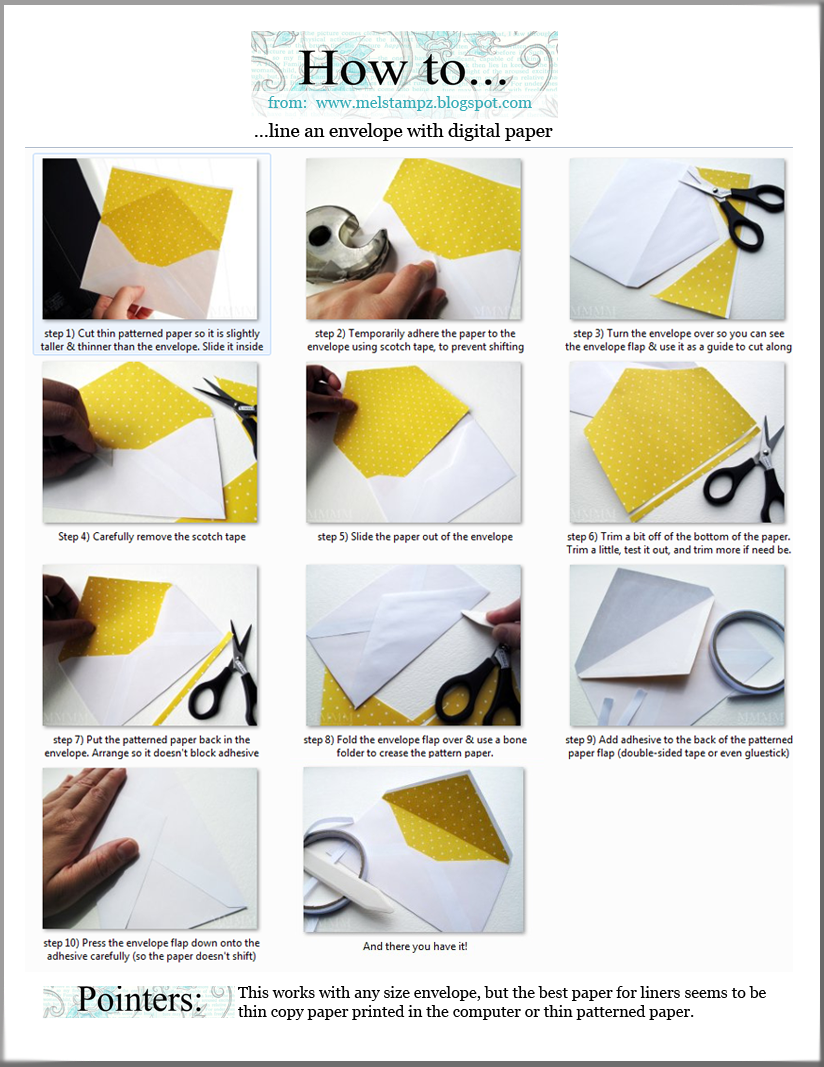
(envelope liner tutorial & PDF download

available in the blog post here)


This is for any of You who would like to

make your own

one-page reference PDF
of a project or tutorial,

but don't want to buy software,

upload photos, or mess around with formatting.


I was SO excited when this weird happy

little thing hopped into my head!


(for blogging tutorials)


I find it handy to name my photos with the

tutorial steps as the file names

then cut & paste that text from the file name

into a Blogger tutorial (it doesn't mess with formatting)

so taking it a little bit further this way

involves next to no work...


...make a speedy PDF:


Basically, it involves these steps:


A) Make a folder on your computer that contains the photo files that you want in your PDF & name the files appropriately (e.g. instruction steps for tutorials).


B) Set the file view to ‘extra-large icons’


C) Take a screengrab (with one click of the PrtScn button on your keyboard)


D) Paste it in Photoshop (or the like)


E) Tweak the size, add a little info, & save it as a PDF.


Here's the PowerPoint with

step-by-step directions:


Click the picture if you'd like to download it.


I've done this tutorial as a PowerPoint because it's easier

to see how to do every little thing in that larger format

but

if the PowerPoint presentation doesn't float your boat,

and you'd like to see it another way, then

please just let me know.


Hope you can use this!


P. S. Don't have PhotoShop? Gimp is an open-source (shared for free) photo editing software that you can download here.


P.P. S. I still have some fun Amber Ink cards to share

with Youse this weekend; it's just been a very hard week.


Read More
Posted in Blogging-tips, organizing | No comments

Sunday, 12 June 2011

Blog layout changes & Pinteresting style

Posted on 13:15 by Unknown


Dear Friends,


You might have noticed a couple of

changes in the blog layout lately.

I've been trying to tidy it all up a bit.


There are new buttons for different parts of the blog:

home3..templates...subscribe..tutorials....about me.pin button


with

two new buttons:


-1-

"Subscribe" button


subscribe


You've had some questions about how to subscribe (sorry that was a pain). But the new button is my attempt at solving the problem. Feedburner & Feedblitz still feel so maze-like to my noodle, but I hope it works for you. If not, please let me know.


Interested in email updates? You can just click the subscribe cloud button & it will take you to a form for FeedBlitz that looks like this:


Just enter your email (where you see my old one "melmc@telus.net") and prove your not a robot then you'll get an email asking you to confirm. Be sure to add the address to your contacts, if you don't want the spam folder to eat up your updates. ;O)


Then, full updates of the posts will be delivered to your inbox when they are up on the blog & you can click through if you want to visit me..........


If you prefer Feedburner,

please use the little box to the right-hand side

in the sidebar, on my blog, under the "subscribe" header

to add your email.II....

..............

Not a fan of full email updates?

You can take your pick of services (Readers etc)

(also in sidebar to the right there, on my blog).


If you liked these old text-based buttons that were on the top of the page:


Fun stuff: 200+ CUTTLEBUG Ideas-FLOWERS-GESSO stuff! Templates:BOXES-Boxes 101-Envelopes-PURSES-Bags-3x3 boxes-HOUSEs-butterflies-CUPcakes-TREES-coffee/tea- -tagsBasics:Faux Sew-SEWING paper-BUTTONS-Distressing-BRADS-ribbon-ALCOHOL INKS -markers


You can still find them, but they're on the bottom. Sorry for the scrolling, but they were getting dated (and felt cluttered).


And last, but not least...


-2-

"Pins" Button

pin button

I love Pinterest
It has bumped up my (life)style


What: It's basically an online inspiration board slash filing cabinet. People save their favourite visuals from around the web by "pinning" them onto boards. It's sheer delight (though to be honest it is addictive & a bit of a time-suck).


Why: It's a visual smorgasbord. You can just browse & drool.


And if you used to like the link lists I made of crafts grouped by type, you might be a fan of Pinterest. My link lists are now visual ones. If you like making your own link lists or roundup posts, you'll love it, since it's SO much easier (no saving photos, uploading, or copying URLs...) :o)


Like the old Hot Crafty Flowers link-list post

which became my Pinterest

DIY flower craft & inspiration board:


pinterest pointers mel stampz

Focus photo credit: Emmaline Bride (here)


(You click on the photos you like & then they open up larger. If you click them again, you can go visit the original source. To make the browsing page for any board have larger or smaller thumbnails: hold the control key while you roll your mouse wheel up/down.)


How:
To follow links on there, I believe you have to join the site, but it's free and very user friendly.


Oddly enough, it's really changed the way I do things daily: I've found better food & drink ideas, gardening, and am feeling like my craft-style has been recharged. (Can't wait to show you some of the things I've been working on based on inspiration from there! That teensy weensy letter at the top of this post is one of 'em).


Anywho, hope the changes are okay.

If you can think of anything you'd like to see,

please just let me know,

Read More
Posted in Blogging-tips, organizing | No comments

Saturday, 11 September 2010

New curvaceous purse basket templates -- free

Posted on 14:45 by Unknown
Plain (un-patterned) version:


You can download the JPGS or find links
to PDFs in the Flickr set here

You can download the basic pieces here
(as PDFs) on SplitCoastStampers

or here on Paper Craft Planet

Damask patterned version:


You can download the damask patterned version here

below is the older chit chat post with acrobat testing
(and a sample of the finished basket)


...a wee peek at the new template (I'm such a tease, hey?)

BUT it is completely finished and all set to go--I just need to test
a new file-sharing method, since 4shared is so-so at best)


(file-sharing PDFs for bloggers)

Trying to find a new
file-sharing method:


I'm experimenting with adobe acrobat online file storage to find a way of
sharing templates that's easier/quicker for you (than 4shared. )

If you'd be so kind to try downloading this 1 template (linked below)
so that I can know if acrobat works well (or not) before I upload & share
all of the many parts of this new curvy basket template...

I'd be so grateful to hear whatever you think of the new acrobat method of
template- downloading, so I can trouble shoot & perfect it.


There seem to be two ways to share files with acrobat:
1)
linking
2) embedding
[not sure which you'd like better??? Both maybe?]


(TEST)

Here's the link method:
Click to download Curvaceous purse basket BOX (no score lines)

Here's the embed method:
(I think this might simply show a preview and
link to download on Acrobat?)


I tried downloading it myself (using the link) and it seemed very speedy.
but I just hope it as well works for you and
Thank You ever so much, in advance, for helping me get this right!


I can't wait to share all the template bits with you!

:o)
Mel
Read More
Posted in Blogging-tips, templates | No comments

Saturday, 6 February 2010

It's Here! it's Here! Caardvarks "Get Published" challenge (and wedding bouquet card pictorial)

Posted on 11:30 by Unknown


Have you been counting down to Caardvarks
"Get Published" challenge with us?
Well, it's here!!!

But ooops, I'm later than usual today; sorry peeps. I uploaded all the pics, realized they were edited but they weren't watermarked & had to re-upload them... Any other bloggers find Blogger veryslow to upload? Any solutions to that?

Anywho, with out further blah-blah, the card...

Caardvarks Wedding card mel stampz

The Caardvarks Get Published challenge theme is
"Make your best Wedding card."

So, I gave it my best...
(edited to add: as part of the Caardvarks design team, not an entry) :o)
...and made a white on a 5 inch x 5 inch
white shabby chic card with a bridal bouquet on it...

Caardvarks Best Wedding Card challenge Bouquet card CLOSE mel stampz

Variations: This style of 3D thingy might also make a nice framed shadow box element...or maybe a gift topper...on a decorated hat box or to jazz up a store bought gift bag, perhaps? ..OR I've got the perfect idea! An Easter hat, teeheehee.

"Just how are you going to put that in an Envelope???" I'm not. LOL. I wasn't worried about lots of dimension, since most people usually give the card when they attend the wedding, and in that situation you could get away with no envelope (I mean they know who it's for, right?) This puppy is obviously not going to fit in an envelope well (unless...you made the box type of envelope--with raised sides, of course. Hmmm note to self: make box envelope template.)

To mail it
, I would put it in a small box, cushioned with tissue paper.


1...Caardvarks Challenge with Scrapbook Trends Card Magazine!
2...Cheap Tricks for blog-surfing or online viewing
3...how to make this wedding bouquet card

-1-


The challenge is to make your very best wedding card

Hope you can play along with this challenge, or
just check out the wedding eye-candy! :o)


(Hope you're the one to get published! I've never been "officially
published" and think it'd be a blast!)


This nifty challenge is sponsored by:
Scrapbook Trends
CARDS Magazine

Wanna check 'em out?
You can subscribe to Scrapbook Trends publications here.
And visit Paige here, on the Scrapbook Trends CARDS Blog!

-2-

(for blog-surfing or online viewing)

You can click on these pictorial photos to enlarge them
& then just hit the back button in your browser, to come back to this post.

Hot-key/ tech tricks: If you want a photo to open in a new tab/window instead of having to find your place after clicking back, just right click and choose open link in a new tab/window (works in Mozilla, anyhow & also works for links...)

Either way you choose to view the photos, you can zoom the enlarged photo in or out with a scroll style mouse by holding control & scrolling up & down. :o)

-3-

...make a wedding bouquet card:


  • GCD Studios Paris Nights collection (#473 Paris Market)
  • Flowers from Fred She Said's Flowering Hearts Doodledallion Digi Set
  • Vellum, Clear & Pearlized embossing powder, heat gun, stylus
  • YG-91 Putty Copic Marker,
  • Three For You flower punch, corner rounder punch
  • Paper piercer, needle, silver thread
  • Pearl seed beads & silver bugle beads
  • Silver edged white satin ribbon & White organza ;o)
  • May Arts white leaves ribbon, & crochet ribbon (cut)
  • Double-sided tape, Tombow Monomulti, Foam Tape
  • Vintage: rhinestone button, Onion skin paper, & pearls
  • River Rock/Dark Cream & Dark Grey cardstock, Silver Zigpainty pen
  • Crochet flowers made by the sweetest Bam Bam in the world (my Grandma)


Step 1) Make a beaded background circle:

1A) Cut a circle of GCD Paris Nights patterned paper (#473 Paris Market) This circle is 4-1/8" in diameter.

1B) Pierce holes around the edge with a paper piercer. (I can't gush enough about this makingmemories Paper piercer; after trying quite a few different peircers, it has no equal in my book. It makes the nicest fine holes & fits in the Tim Holtz ruler for perfect placement--even has a needle holder & threader in the end. Smart, huh?)

1C) Stitch on beads. (I used silver thread & pearl seed beads alternated with lovely silver bugle beads. Bugle beads make it go faster, since they take up more room, and thus you need less...)


Step 2) Edge with silver zigpainty pen, for definition.


Step 3) Stitch on thin ribbon to make an asymmetrical bow. Just loop & lay it down and stitch through the paper--adhering thread ends at the back of the paper with double-sided tape. No need to be perfect since most of it will be covered.

You could glue the bow if you prefer, of course; I used glue to temporarily hold the bow & sewed it. I just trust stitching to hold better & find it gives much more control over the bow shaping.


Step 4) Stitch on May Arts white ribbon leaves (again, you could glue...)


Step 5) Stitch on crochet flowers (Thank you my sweet talented Bam Bam! LOVE you soooooooh much!!! OXOXO)


Step 6) Sew pearls in the center of the crochet flowers. These are just from an old necklace I got a thrift shop (I think it may have been broken when I bought it.)


Step 7) Make large pointy-petaled embossed paper flowers & stitch them on, adding pearl bead (these paper flowers are from Fred She Said's Flowering Hearts Doodledallion Digi Set (posting all the details for that tomorrow)


Step 8) Make small white embossed vellum flowers & stitch them on also with pearl beads.


Step 9) Create the rough crochet trim & mat:

A) Cut crochet lace in half down the middle with nice sharp scissors
B) Adhere to the back of the circle. (double-sided tape to hold it temporarily while I made sure it was even)
Stick that on another larger circle of cardstock (River Rock) & (I added tombow at this point for a better hold)
C) roughly cut the mat, making slits for a make a wide fringe
D) Ruffle it with your fingers to distress it.


Step 10) Cut another piece of GCD Paris Nights patterned paper (4-1/2" square) & lay a piece of vintage onion skin paper over it. Trace with a paper piercer (on top of something soft like fun foam) to get a torn but straight edge (or use a ruler & tear it.)


Step 11) Glue the onion skin to the patterned paper & pierce and stitch it with silver thread.


Step 12) Add a bow at the top (This one was made using white Organza ribbon & a vintage rhinestone button.)

Adhere the stitched onion-skin papered mat to a 5x5 inch
River Rock cardstock card (with rounded corners)
&
adhere the bouquet circle with foam tape for dimension:

(These are click-able blogger photos)

...and th-th-th-th-that's all folks...


Thank You so much for taking time to check this out, & thanks ever so much for the love yesterday. You ROCK!


(click to visit the blog from an email or reader)
...to subscribe: Feedburner or Feedblitz


P.S. Tomorrow, all the details on making the flowers...

Punch guides for digital flower centers
(using Photoshop/other software)


Both sizes of paper flowers used on this card are made with that digital set from Fred She Said I mentioned. Tomorrow, I have a tutorial to share with you on how I made a punch template in photoshop (to be able add evenly-spaced centers) and some yadda yadda about stamping & embossing and shaping the punched flowers.)

Read More
Posted in Blogging-tips, Caardvarks, Faves, Punches, techniques, Tutorials | No comments
Older Posts Home
Subscribe to: Comments (Atom)

Popular Posts

  • free Butterfly Silhouette .studio cut files (in 3 styles)
    Hi, All! Here are those butterfly Silhouette .studio cut files. They are for only for the Silhouette machine... But I do hope to share other...
  • Flying by to say ... 'hello'
    Do you shop for stamps often? I don't have a huge crafting budget, but every once in a while I find some images that call out "you ...
  • a Silhouette Challenge project
    This might look like a card in the photo, but...   ... it's actually a collage on a wooden canvas  to hang on the wall (or give as a gif...
  • Silhouette Cameo - Sketch pen Camera card
    Happy Happy Independence Day, to my American Friends! (and happy belated Canada Day to my fellow Canadians!) So, have those of you with Silh...
  • over 100 free pattern overlays ... at a glance
    Would you believe that the free overlay total is at 139 overlays and counting? (I might have a wee little addiction) ;-) Since overlays can ...
  • Graphics Fairy Inspiration (+vintage printables)
    Thank You all so much for your wonderful comments about the papers I've been obsessed with. Your kind words make me grin so big that I g...
  • Circle Overlays (to revamp your papers!)
    Can you ever have too many ways to use your stash? No card today, just popping in with a cheap trick for revamping your "old" pat...
  • New Popcorn Box template set (pretty stamp room storage) :o)
    Are you in the mood for a template or two? I was going to wait until I had really good photos and a full pictorial, but then I would take fo...
  • "Honey, I shrunk the stationery!" (Hero Arts typewriter notebook)
    Still trying to make more of my cards into little gifts. This Hero Arts typewriter card is another take on the card turned refillable notebo...
  • Everything I've Ever Made (at a glance)
    This post is a visual overview of my blog history-- with thumbnails that are linked to tutorials & templates for pretty much everything ...

Categories

  • 'Mouse'-the-cat (10)
  • *TEMPLATEs (98)
  • 3D-projects (144)
  • A-Day-For-Daisies (7)
  • Amber Ink (9)
  • Angel's-Landing (2)
  • BASICS (47)
  • Blogging-tips (7)
  • Caardvarks (48)
  • Cat's-Pajamas (2)
  • cheap-tricks (224)
  • Christmas (33)
  • Claire-Keay (2)
  • Cricut (3)
  • cut-file (2)
  • Cuttlebug (45)
  • decor (6)
  • Digital-Images (131)
  • Distress-Inks-etc (14)
  • DIYstamps (1)
  • Eat-Cake-Graphics (11)
  • Faves (207)
  • Fred-She-Said (5)
  • Freebies (77)
  • GESSO (9)
  • Halloween (10)
  • Heather Ellis (3)
  • Hero-Arts (14)
  • ISC (7)
  • Jessica-Sprague (2)
  • Just-Rite (2)
  • LPS (63)
  • Mo's-Digital-Pencil (16)
  • My-Favorite-Things (33)
  • organizing (7)
  • Other-People's-Tutorials (36)
  • Paper-Garden-Projects (54)
  • Paper-Temptress (39)
  • Punches (21)
  • Purple-Onion-Designs (23)
  • S.U. (1)
  • SCOR-PAL (4)
  • silhouette (4)
  • Skipping-Stones-Design (7)
  • Squigglefly (6)
  • SRM-Stickers (8)
  • techniques (191)
  • templates (26)
  • Tiffany-Doodles (4)
  • Tutorials (252)

Blog Archive

  • ▼  2013 (16)
    • ▼  July (4)
      • A Triple-stamped Fancy-cut Flower card
      • Flying by to say ... 'hello'
      • a Silhouette Challenge project
      • Silhouette Cameo - Sketch pen Camera card
    • ►  June (4)
    • ►  May (3)
    • ►  April (1)
    • ►  March (1)
    • ►  February (3)
  • ►  2012 (53)
    • ►  December (2)
    • ►  November (2)
    • ►  October (1)
    • ►  August (3)
    • ►  July (2)
    • ►  June (5)
    • ►  May (7)
    • ►  April (8)
    • ►  March (9)
    • ►  February (13)
    • ►  January (1)
  • ►  2011 (74)
    • ►  December (1)
    • ►  November (5)
    • ►  October (10)
    • ►  September (9)
    • ►  August (12)
    • ►  July (5)
    • ►  June (9)
    • ►  May (2)
    • ►  April (6)
    • ►  March (7)
    • ►  February (4)
    • ►  January (4)
  • ►  2010 (84)
    • ►  December (7)
    • ►  October (1)
    • ►  September (6)
    • ►  August (1)
    • ►  June (1)
    • ►  May (7)
    • ►  April (21)
    • ►  March (3)
    • ►  February (17)
    • ►  January (20)
  • ►  2009 (234)
    • ►  December (16)
    • ►  November (21)
    • ►  October (11)
    • ►  September (23)
    • ►  August (29)
    • ►  July (26)
    • ►  June (10)
    • ►  May (16)
    • ►  April (26)
    • ►  March (22)
    • ►  February (27)
    • ►  January (7)
  • ►  2008 (39)
    • ►  December (14)
    • ►  November (25)
Powered by Blogger.

About Me

Unknown
View my complete profile