StampznewBright

  • Subscribe to our RSS feed.
  • Twitter
  • StumbleUpon
  • Reddit
  • Facebook
  • Digg

Tuesday, 15 May 2012

How to Download papers & overlays from Flickr

Posted on 21:30 by Unknown
Some of you lovely people have asked how to download files from flickr
(where, incidentally many of my as-yet-unblogged paper sets
are hiding themselves away as they await their own blog posts).

So, I thought I'd share a tutorial showing the details
of how to download from flickr (or at least the way I do it).


The following pictorial is for PC users,
but mac users can download this way: 

1) visit flickr, choose view all sizes from above the photo, 
2) click where it says original, 
3) click "Download the original size of this photo"

9-blue_raspberry_BRIGHT_world_MAP_and_a_half_inch_SQ_350dpi_melstampz7-lime_BRIGHT_PENCIL_DAMASK_SOLID_melstampz_12_and_a_half_inches_SQ_350dpi9-blue_raspberry_BRIGHT_Sweetly_Scrapped_bus_ticket_12_and_a_half_inches_SQ_350dpi_melstampz

Brightly coloured paper printables mel stampz

-1-


You can find my flickr gallery here.
(It's a mix of all my blog photos, like: the ones for this
tutorial, cards photos & free papers overlays, templates, et cetera).


-2-


How to download my free
papers & overlays from flickr:


This may seem sort of complicated
but really it's just a lot of right clicking
and saving a file. ;-)


Step 1) Go to my flickr Photostream. You can find it here,
or
you can see all of my sets in one spot here:

sets

Step 2) Click on the image of the set that you'd like to look at,
it will open up a page that looks something like this:

1) click the image of the paper (here on my blog) it will take you to the location of the set (on flickr)

Step 3) Click on the thumbnail of the colour you want:

2 Click on the thumbnail of the paper you want to download

Clicking the thumbnail will take you to the page for that particular colour,
you can then do one of two things:

1) You can add it to your flickr favorites (if you have a flickr account.
The basic account is free). This option is nice, since
there is no need to take up space on your computer by downloading.

or 2) you can save the file if you like...

2b Clicking the thumbnail will take you to the page for that particular paper you can add it to your favorites OR

Step 4) To save a file on flickr, right click on the image with your mouse
and select original (from where it says view all sizes):

3 Right click on the image with your mouse and select 'original'

Clicking original will open the image in its original size (which is usually large).

Step 5) Right click on it once more and choose save image as:

3b Right clicking will open the image large (in its original size) right click on it once more and choose save image as

Step 6) you can rename the file, if you want to
and hit the save button:

rename if you like and hit save

And that's it!
(It takes about 30 seconds) :-)

Not familiar with flickr? Here's a little bit of
rambling info based on my experience with it...


-3-


Why use flickr?

Did you know that Blogger converts & reduces images to 72dpi? This usually
doesn't matter for viewing on the computer, but it makes for horrible printing
So, to get around it, I pay for a pro account and host my printable freebies
on flickr where they images can remain at 350dpi for print quality.

What is flickr?

Flickr is an image hosting site where people upload their private photos
or images they want to share. There are some lovely people with flickr galleries
that have share alike settings or other settings
that allow you to use their images for different things.

What do those settings mean?

If you right click on an image, you can see it's license setting.

You might see "all rights reserved" on an image,
that means it's one that we shouldn't save or use in any way.

flickr settings

But some images have a creative commons license which means you are
allowed to use the image (sometimes with exceptions).

You can read all about those licenses here, if you like:
http://www.flickr.com/creativecommons
They'll let you know what use different flickr members
have allowed (or not allowed) with their images. :-)

How do I find things on flickr?

Try searching on flickr using the keyword free... with ...
collage sheet; printable; paper; free vintage images;
template; pattern; and so forth.


I hope this has been helpful to those who want to download
from flickr, but if you have any questions at all, please fire away!
Read More
Posted in BASICS, Blogging-tips, Tutorials | No comments

Saturday, 12 May 2012

Sunny Blooms

Posted on 11:15 by Unknown
Hi Guys. Just a simple card for today, and not a lot of chit chat.

Mr. Migraine is winning this week something awful
(the big jerk!) ;-)

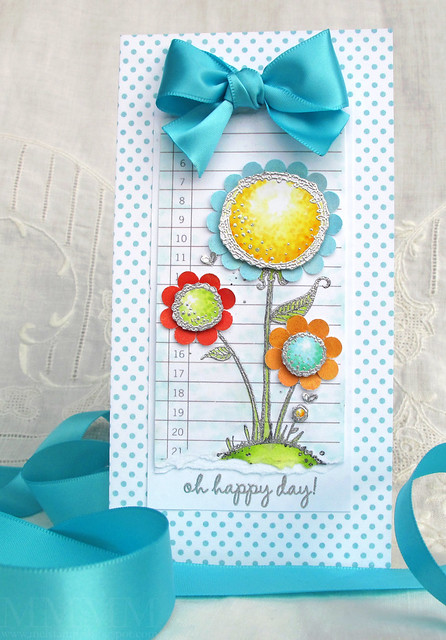
happy day flowers

The stamp is called Sunny Blooms and it's
from Purple Onion Designs, by Stacey Yacula
.

The blooms are heat embossed in silver
&
I punched circles of distress inked paper
with a 1/4" circle punch, to put under the blooms
as flower petals...

happy day flowers - detail

...then popped the flower centers (which were stippled with
Copic markers) on foam dots.


Hope you like it,

Read More
Posted in Purple-Onion-Designs | No comments

Tuesday, 8 May 2012

'Peep' tag card

Posted on 10:50 by Unknown
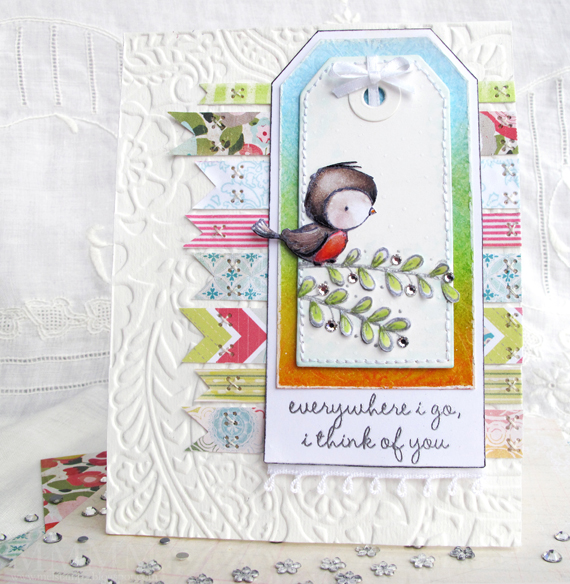
Peep tag card

Here's a Spring-ish kind of card with
that cutie-pie "Peep"
from Purple Onion Designs.

Peep was coloured with Copic markers & cut out
so he could stick his little tail off the edge of the tag:


(The silver heat embossed leaves are cut out too
& I added some Swarovski crystals).

The tag was coloured with distress inks:


(Tumbled Glass, Broken China, Evergreen Bough,
Mustard Seed, Wild Honey and Spiced Marmalade).
then heat embossed (in clear) with a background stamp
Hero Arts Ancient Motif stamp.


Combining faux washi tape with real washi tape
is a sneaky way to get more variety in your washi palette
without buying more washi tape...


These strips of pattern are a mix of:
  • Washi tape, as is (#5 the pink striped one)
  • Copic marker altered washi tape (#8 green on the right).
  • Crate Paper Paper Heart 6x6 paper (#1,2,4,7)
  • DIY digital paper cut into strips (#3,6)
(It's always fun to save money, right? Plus it's a
good way to use up your smallest paper scraps).


Want to make your own Washi tape?
There are over 100 tutorials for DIY craft tape
& lots of ways to use it here:
washi tape collage mel stampz


And of course 'Peep' lives with his buddies in
'The Sweetest Day' collection here:


You can see more examples of the stamps in
cards by some very talented ladies here:


Hope you're having a gorgeous week!
We're off to tackle our community garden
plot some more. Spring is the best, no?

Hugs,

P.S. The embossing folder I used on the watercolour paper for the background is a Sizzix Tropical Paisley folder from this duo, in case you're curious.
Read More
Posted in cheap-tricks, Purple-Onion-Designs | No comments

Thursday, 3 May 2012

Baby Boy bunny faux window card

Posted on 10:00 by Unknown


What do
a piece of old plastic packaging, a toothpick,
some buttons, seam binding, scallop edging...

... and ...

...some stamping, snipping, and stitching
have in common?


They all live here
on this faux window card:

button bunny baby boy

The card measures 5.5 inches square
and is made of watercolour paper.


The bunny is stamped on Paper Crate Paper Heart 6x6 paper
He is called Poppy and he's one of "The Sweetest Day!"
rubber stamps from Purple Onion Designs by Stacey Yacula.

You can see the whole kit
& kaboodle here, if you like:


Hope you're having a
hopping good day!


Read More
Posted in Purple-Onion-Designs | No comments

Friday, 27 April 2012

CAS-ual Friday: Delicate Branches card

Posted on 13:05 by Unknown
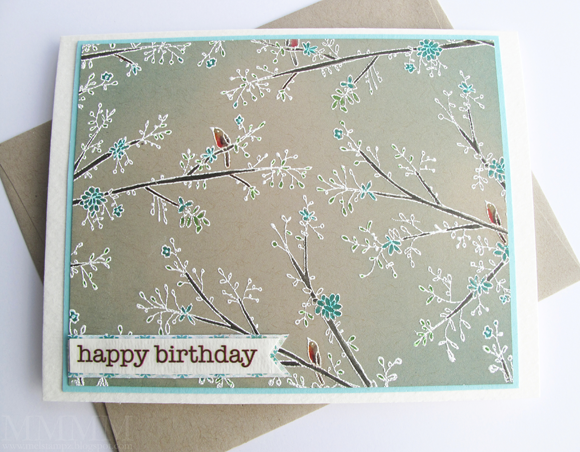
A simple birthday card I made for someone special...

Hero Arts Delicate Branches background stamp & SRM sticker sentiment

It was made this way:

-1-

1) Cut a piece of kraft coloured cardstock to size (to fit a standard card).
2) Stamp Hero Arts Delicate Branches stamp in Frost White Colorbox ink.
3) Cover stamping with white embossing powder & heat with a heat gun.
4) Colour the branches, flowers and some leaves) with Copic markers.
5) Apply Distress Ink (with foam applicator) to softly colour the edges.
6) Add the kraft cardstock image to some turquoise cardstock (for a mat).
7) Stick it on a white top-fold card & add the SRM sticker on a little flag.

Hero Arts Delicate Branches background stamp

-2-


This card is for the CAS-ual friday
challenge here:


The challenge is to make a C.A.S.
card with flowers or trees.

Thankfully, this Delicate Branches stamp
from Hero Arts has both:


The challenge
is sponsored by:


And the brown "happy birthday" sentiment
on the card is from their 'Happy' sticker set:


Here's hoping that you have
a gorgeous weekend,

Read More
Posted in Distress-Inks-etc, Hero-Arts, SRM-Stickers | No comments
Newer Posts Older Posts Home
Subscribe to: Comments (Atom)

Popular Posts

  • free Butterfly Silhouette .studio cut files (in 3 styles)
    Hi, All! Here are those butterfly Silhouette .studio cut files. They are for only for the Silhouette machine... But I do hope to share other...
  • Flying by to say ... 'hello'
    Do you shop for stamps often? I don't have a huge crafting budget, but every once in a while I find some images that call out "you ...
  • a Silhouette Challenge project
    This might look like a card in the photo, but...   ... it's actually a collage on a wooden canvas  to hang on the wall (or give as a gif...
  • Silhouette Cameo - Sketch pen Camera card
    Happy Happy Independence Day, to my American Friends! (and happy belated Canada Day to my fellow Canadians!) So, have those of you with Silh...
  • over 100 free pattern overlays ... at a glance
    Would you believe that the free overlay total is at 139 overlays and counting? (I might have a wee little addiction) ;-) Since overlays can ...
  • Graphics Fairy Inspiration (+vintage printables)
    Thank You all so much for your wonderful comments about the papers I've been obsessed with. Your kind words make me grin so big that I g...
  • Circle Overlays (to revamp your papers!)
    Can you ever have too many ways to use your stash? No card today, just popping in with a cheap trick for revamping your "old" pat...
  • New Popcorn Box template set (pretty stamp room storage) :o)
    Are you in the mood for a template or two? I was going to wait until I had really good photos and a full pictorial, but then I would take fo...
  • "Honey, I shrunk the stationery!" (Hero Arts typewriter notebook)
    Still trying to make more of my cards into little gifts. This Hero Arts typewriter card is another take on the card turned refillable notebo...
  • Everything I've Ever Made (at a glance)
    This post is a visual overview of my blog history-- with thumbnails that are linked to tutorials & templates for pretty much everything ...

Categories

  • 'Mouse'-the-cat (10)
  • *TEMPLATEs (98)
  • 3D-projects (144)
  • A-Day-For-Daisies (7)
  • Amber Ink (9)
  • Angel's-Landing (2)
  • BASICS (47)
  • Blogging-tips (7)
  • Caardvarks (48)
  • Cat's-Pajamas (2)
  • cheap-tricks (224)
  • Christmas (33)
  • Claire-Keay (2)
  • Cricut (3)
  • cut-file (2)
  • Cuttlebug (45)
  • decor (6)
  • Digital-Images (131)
  • Distress-Inks-etc (14)
  • DIYstamps (1)
  • Eat-Cake-Graphics (11)
  • Faves (207)
  • Fred-She-Said (5)
  • Freebies (77)
  • GESSO (9)
  • Halloween (10)
  • Heather Ellis (3)
  • Hero-Arts (14)
  • ISC (7)
  • Jessica-Sprague (2)
  • Just-Rite (2)
  • LPS (63)
  • Mo's-Digital-Pencil (16)
  • My-Favorite-Things (33)
  • organizing (7)
  • Other-People's-Tutorials (36)
  • Paper-Garden-Projects (54)
  • Paper-Temptress (39)
  • Punches (21)
  • Purple-Onion-Designs (23)
  • S.U. (1)
  • SCOR-PAL (4)
  • silhouette (4)
  • Skipping-Stones-Design (7)
  • Squigglefly (6)
  • SRM-Stickers (8)
  • techniques (191)
  • templates (26)
  • Tiffany-Doodles (4)
  • Tutorials (252)

Blog Archive

  • ▼  2013 (16)
    • ▼  July (4)
      • A Triple-stamped Fancy-cut Flower card
      • Flying by to say ... 'hello'
      • a Silhouette Challenge project
      • Silhouette Cameo - Sketch pen Camera card
    • ►  June (4)
    • ►  May (3)
    • ►  April (1)
    • ►  March (1)
    • ►  February (3)
  • ►  2012 (53)
    • ►  December (2)
    • ►  November (2)
    • ►  October (1)
    • ►  August (3)
    • ►  July (2)
    • ►  June (5)
    • ►  May (7)
    • ►  April (8)
    • ►  March (9)
    • ►  February (13)
    • ►  January (1)
  • ►  2011 (74)
    • ►  December (1)
    • ►  November (5)
    • ►  October (10)
    • ►  September (9)
    • ►  August (12)
    • ►  July (5)
    • ►  June (9)
    • ►  May (2)
    • ►  April (6)
    • ►  March (7)
    • ►  February (4)
    • ►  January (4)
  • ►  2010 (84)
    • ►  December (7)
    • ►  October (1)
    • ►  September (6)
    • ►  August (1)
    • ►  June (1)
    • ►  May (7)
    • ►  April (21)
    • ►  March (3)
    • ►  February (17)
    • ►  January (20)
  • ►  2009 (234)
    • ►  December (16)
    • ►  November (21)
    • ►  October (11)
    • ►  September (23)
    • ►  August (29)
    • ►  July (26)
    • ►  June (10)
    • ►  May (16)
    • ►  April (26)
    • ►  March (22)
    • ►  February (27)
    • ►  January (7)
  • ►  2008 (39)
    • ►  December (14)
    • ►  November (25)
Powered by Blogger.

About Me

Unknown
View my complete profile