StampznewBright

  • Subscribe to our RSS feed.
  • Twitter
  • StumbleUpon
  • Reddit
  • Facebook
  • Digg

Wednesday, 25 February 2009

A Party Invite! LPS Digi Images! & a Hybrid Technique (embossing From your printer)

Posted on 08:45 by Unknown

Hi All,

Hope everything is wonderful with you. I'm so slowly recovering from moldiness, but I'm lucky to have lots of thrilling things to keep me upbeat...

For today's post, an ode to the printer. Hybrid stuff...
  • 1 --> New Digital Images to Print: a Sale on everything in the store at The Little Paper Shop including the new digital Images (which are already so affordable.) Today's the last day!
  • 2 -->Paper to Print 'em on: my invitation to You to join us for the Paper Temptress party on Paper Craft Planet tonight!
  • 3 --> One way to print 'em: a hybrid technique embossing any image from your printer on Glimmer cardstock (my first Copic tutorial)

Digital Images to Print:

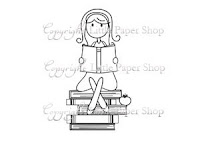
The sweetest new images are available digitally at LPS.
Click the pics to go to the store & check em out:
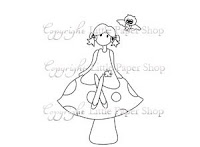
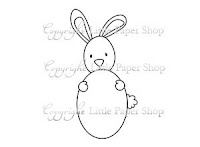
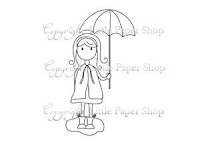
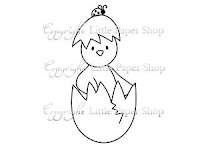
Paper to Print them on:

You know I love Paper Temptress papers. (The tutorial below uses one of their cardstocks.) They have so many stunning papers to choose from to make your projects unique. Now there'll be even more paper to tempt us! I'd love it if you'd join me & the DT...Here's an invite:

to All You paper lovers:
it's a Paper Temptress Parteh!

What:
1st:
New Papers!!! Paper Temptress will be stocking 50 NEW kinds of paper this week
2nd: Paper Prizes & all the DT available in chats on PCP to dish about all the Paper Temptingness.

Sneakie Hint: There'll be a loverly variety of new papers for everyone--from you Copic Conoseurs or Watercolourists....to you Metallic Mavens and Divas of 3D Buildin' heehee ;O)

Why:
To celebrate the new additions, we're havin' a release party on Paper Craft Planet! Come & Join us (the Paper Temptress design team & other Peeps who are happily tempted by the love of Paper.) Everyone will be entered to win a package with a sheet of every single one of the new cardstock. (Two people will win that whole package of 50 sheets each.) That's a whole lotta gorgeous paper goin' on. :O)

When:
Tonight! Wednesday, February 25th, 8:00 PM Central time, (9:00PM Eastern time 7:00PM Mountain Time and 6:00PM Pacific Time.)

Where:
The Paper Temptress group on Paper Craft Planet.

...and now for those of you interested in a tutorial

One way to print digital images...

Embossing digital images &
Copic Colouring on Metallic paper:

This will not be new to some of you at all, but I'm hoping it'll be something neat & new for someone out there to discover. I know that I thrill to my toes each time I try it.

The image is one I drew a while ago, for my most lovely MIL Esther who loves hummingbirds. I scanned it & printed it onto gorgeous Glimmer Cardstock (Beargrass):


With the right cardstock, you can emboss any image from your printer.
My three favourites for this are:
  1. Glimmer Cardstock (which I used here; it comes in drool-worthy colours)
  2. Vellum cardstock (the classic in my book)
  3. Mica or Metallic cardstock (such vibrant colours!)
These papers let the printer ink stay wet for you to sprinkle embossing powder on.

Some tips that might work for you:
  1. Have your embossing powder & gun at the ready
  2. Print images on standard/fast setting (ink stays wetter)
  3. Sprinkle embossing powder on as soon as it prints
  4. Heat cardstock from the back first (avoids blowing ep off)


The Colouring:

Copics behave amazingly on this Glimmer cardstock, since they don't soak in. Which means:

A) They're easier to handle (no need to colour in circles)
B) You can capture "brush strokes" (like the little feather lines I got here)
C) You save a lot of that pricey Copic ink (the paper doesn't drink it in)

Perhaps the kewlest thing about Copics on Glimmer cardstock, though, is the glimmer. heehee. The snazzy shimmer of the paper lets the Copics float over it, and your colouring gains a sparkling H2Os quality. It's not too shimmery though, which seems classy to me.

Mixing Marker Mediums:

I may be a freak ;o) but I mix waterbased markers with Copics. It seems to work quite nicely and extends the colour range you have immensely.

Here's how I coloured this...
(Please click the pics if you'd like a bird's-eye view) ;o)

One of the awesome advantages to digi-images is that you can use photo software to print multiple images, so you can print off a full sheet of your image (and emboss them all in one quick go too!) This is embossed with clear embossing powder which made it look like embossed pencil (neato!)

If you colour all your images at once, you'll have a whole gift set (or a stash of images) in no time. Of course, you can divide them into groups for different colour variety too. I coloured mine all in olive & aqua for a set of giftie cards:


Step 1) Colour leaves with a Pale Olive YG-95 copic marker


Step 2) Colour flowers with a Frost Blue B00 copic:

I start with a light over all colour --leaving the center with no colour--and then add more of the blue to the parts of the flower that are closer to you (since dark colours appear to advance & that gives you more dimension.)


Step 3) Scribble Nile Blue BG45 onto an acrylic block or other slick surface (Scribbling on & picking up colour is a great way to get more of a range of colours out a smaller Copic marker Collection.)


Step 4) Pick up the nile blue ink off of the block with the lighter Frost Blue B00 marker & shade the flowers.


Step 5) Scribble Cadmium Yellow Y15 onto the block


Step 6) Pick up Cadmium Yellow with a colourless blender & colour the center of the flowers. This lets you create a super soft yellow out of a very intense marker.
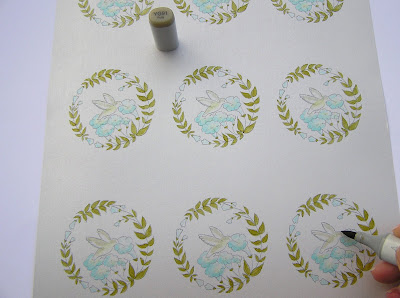


Step 7) Colour parts of hummingbird with a Putty YG-91 Copic. Here's a close view of the putty colour:
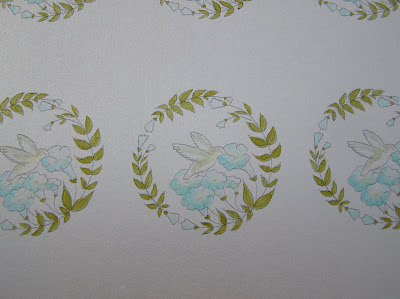


and now for the water-based marker. This is a black from Close to my Heart:
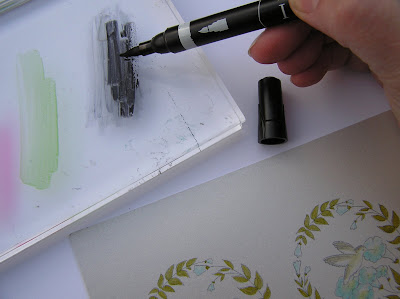


Step 8) Scribble black marker onto the block.


Step 9) Pick the black up with Putty marker. Test it on a scrap & add in feather lines.


Step 10) To create a pink: Scribble & Pick up Lipstick Red L-29 with a colourless blender & add a bit of pink to the hummingbird.


Step 11) Scribble & pick up Moss YG-67 with colourless blender & colour a little of it onto the hummingbird


and that's that! :O)


P.S. Cathy at Paper Garden Projects has Copics on sale for 25% off (to counteract the price hikes. Yay Cathy!)

Quick Links:

Little Paper Shop's New Digi Images
Paper Temptress Store
Paper Temptress PCP Party
Copic Sale at Paper Garden Projects


Read More
Posted in cheap-tricks, LPS, Paper-Garden-Projects, Paper-Temptress, techniques, Tutorials | No comments

Tuesday, 24 February 2009

Rolling Hills Box & Matching Card (Farmyard Friends Stamp Kit)

Posted on 08:08 by Unknown


This was sooooo fun to make. I love that sheep too much! The two buddies above are made with the same stamp (You can just cut the flower off to make the black sheep) and he's eating grass. heeheehee.

I grew up on a farm in beautiful Queensville Ontario, so this brings back sweet memories of playing on the rolling hills. Though, we never had sheep (it was a cattle farm.) My Charles Charming had sheep though. Lots of them! So it sends him down memory lane too. :O)

Supplies:
(From the Paper Garden Projects Farm Friends Stamp Kit)

Stamp: Sheep with flower in its mouth (Designed by Pink Cat Studio)

1 piece of Parakeet (lovely grass green) textured Cardstock
1 piece of Wedding White Cardstock

Other Materials:
(from your stash or Paper Garden Projects)

For Box:
Scor-Pal
Oh So Sticky tape

For Fence:
Tim Holtz Design Ruler
Pencil
Scissors or a Stampin' Up word window punch
Tombow Monomulti

For Sheep:
Black ink
Copic Markers: Black, BG-15 Aqua, & RV-11 Pink
watercolour pencil crayons
White Marvy Uchida Puffy Velvet marker


To Download PDFs for
Rounded Box
Templates Click here


Here are the JPG versions:


How To:


To make the Rolling Hills Box:

Step 1) Print rounded basket template onto the textured Parakeet cardstock (lovely grass green.) You can use either template (the one with no dotted lines or the one with lines, whichever you're more comfortable with)

Step 2) Cut the box out on the solid lines.

Step 3) Score where the dotted lines on the score guide indicate. (Save assembling the box until last.)


Creating the fence
(with a Word Window punch or by hand):

Step 1) Make a cutting/punching guide:

A) Cut a piece of Wedding white cardstock (roughly 3 inches high by 6 inches long)
B) Mark it at every 1/4 of an inch.
C) Cut the fence posts:
  • If you're cutting by hand, then just cut away every other 1/4 inch section to make the fence posts.
  • If you're punching, then cut the piece into 2 3 inch halves (so the punch will reach)
Step 2) Adhering the fence to the box:


A) Check for fit: Make sure the punch marks (or cuts) go deepest on either end where the box curves down (You can dry fit it to check that it all fits well.)


B) Mark where to adhere it: Using the front of the box, mark the fence so you have a guide for where to adhere (You can draw the fence points on now too if you like, or just freehand cut them later..)


C) Add adhesive to the fence under the marks you've made


D) Trim the ends of the fence (using the box edges as a guide)


Step 3) Create the picket points (free hand or following your pencil markings)


Step 4) Fashion a curved fence railing:

A)
Place the front of the box onto the top of a piece of Wedding White cardstock & trace the curve.


B) Move the box down about 1/4 of an inch & trace the curve a second time.


C) Cut the railing line out & erase pencil marks


D) Weave the railing through the fence pickets & adhere it (or you can just adhere the railing on top or behind the fence pickets.)

Step 5) Make a liner (for inside the front of the box) to hide the fence bottom mess:


A) Trace back of box onto a scrap of the Parakeet (grass green) cardstock


B) Cut front liner piece


C) Adhere front liner piece to the inside of the front of the box (over the fence bottom mess.)

Assembling & Embellishing the Box:


Step 1) Assemble the box (adding Oh So sticky tape on the 4 tabs)


Step 2) Stamp or Emboss the sheepie & cut it out (I cut the flower off.)


Step 3) Colour the sheep in with a black marker. (I used a black Copic Marker it adds contrast to the fence, but it also hides the swirl of the cut off flower.)


Step 4) Make grass strips by cutting wavy pieces & fringing them. Cut little pieces of grass for the sheep to eat too. :O)


Step 5) Adhere grass to the bottom of the box (on all the sides)


Step 6) Adhere the grass in the sheep's mouth (from the back.) Tombow Monomulti is just right for this application.)


Step 7) Adhere the sheep to the top of the box behind the fence (or wherever he/she feels like grazing. :O)


To Make a Matching Card:


Step 1) Clone the Sheep (Dolly, is that you?) hehehe: Stamp or emboss the sheep onto Wedding White cardstock

Step 2) Colour your image however you like (I used Copics on the flower (BG-15 Aqua) & for a blush on the face (RV-11 Pink)

Step 3) Add a little shadowing (I used watercolour pencil crayons in grey & a light touch of black)


Make Dolly puffy

Step 4) Make your sheep puffy using a White Marvy Uchida Puffy Velvet marker. To add puffy pen details:
  • Shake it up
  • Colour it on (I like to dab in dots)
  • Heatgun it right away for lots of puff (for less puff, let it dry before heat gunning it)
Step 5) Cut your sheep out

Making the hills:


A) Cut some of the Parakeet (green) cardstock to measure 4 2/8" wide.
B) Cut it into a hill (about 3 inches high & sloping down.)
C) Cut another 4 2/8" wide piece into a wavy strip.
D) Stamp "baa" on it & fringe it.


To make the sky (and the main card):

A) Cut a piece of cardstock to measure 11 by 4 2/8" & fold it in half.
B) Sponge blue pastel or ink onto it to create a cloudy sky.
C) Adhere the hills to it & adhere the strip of fringed grass at the bottom.
D) Finish by adhering the sheep too.


Thank Ewe for being Ewe!
You make the Net a place as lovely as rolling green hills!


Quick Links:

FarmYard Friends Stamp Kit
Cathy's Blog
Tracy's blog
:O)


Read More
Posted in *TEMPLATEs, 3D-projects, Faves, Paper-Garden-Projects, Tutorials | No comments
Newer Posts Older Posts Home
Subscribe to: Comments (Atom)

Popular Posts

  • free Butterfly Silhouette .studio cut files (in 3 styles)
    Hi, All! Here are those butterfly Silhouette .studio cut files. They are for only for the Silhouette machine... But I do hope to share other...
  • Flying by to say ... 'hello'
    Do you shop for stamps often? I don't have a huge crafting budget, but every once in a while I find some images that call out "you ...
  • a Silhouette Challenge project
    This might look like a card in the photo, but...   ... it's actually a collage on a wooden canvas  to hang on the wall (or give as a gif...
  • Silhouette Cameo - Sketch pen Camera card
    Happy Happy Independence Day, to my American Friends! (and happy belated Canada Day to my fellow Canadians!) So, have those of you with Silh...
  • over 100 free pattern overlays ... at a glance
    Would you believe that the free overlay total is at 139 overlays and counting? (I might have a wee little addiction) ;-) Since overlays can ...
  • Graphics Fairy Inspiration (+vintage printables)
    Thank You all so much for your wonderful comments about the papers I've been obsessed with. Your kind words make me grin so big that I g...
  • Circle Overlays (to revamp your papers!)
    Can you ever have too many ways to use your stash? No card today, just popping in with a cheap trick for revamping your "old" pat...
  • New Popcorn Box template set (pretty stamp room storage) :o)
    Are you in the mood for a template or two? I was going to wait until I had really good photos and a full pictorial, but then I would take fo...
  • "Honey, I shrunk the stationery!" (Hero Arts typewriter notebook)
    Still trying to make more of my cards into little gifts. This Hero Arts typewriter card is another take on the card turned refillable notebo...
  • Everything I've Ever Made (at a glance)
    This post is a visual overview of my blog history-- with thumbnails that are linked to tutorials & templates for pretty much everything ...

Categories

  • 'Mouse'-the-cat (10)
  • *TEMPLATEs (98)
  • 3D-projects (144)
  • A-Day-For-Daisies (7)
  • Amber Ink (9)
  • Angel's-Landing (2)
  • BASICS (47)
  • Blogging-tips (7)
  • Caardvarks (48)
  • Cat's-Pajamas (2)
  • cheap-tricks (224)
  • Christmas (33)
  • Claire-Keay (2)
  • Cricut (3)
  • cut-file (2)
  • Cuttlebug (45)
  • decor (6)
  • Digital-Images (131)
  • Distress-Inks-etc (14)
  • DIYstamps (1)
  • Eat-Cake-Graphics (11)
  • Faves (207)
  • Fred-She-Said (5)
  • Freebies (77)
  • GESSO (9)
  • Halloween (10)
  • Heather Ellis (3)
  • Hero-Arts (14)
  • ISC (7)
  • Jessica-Sprague (2)
  • Just-Rite (2)
  • LPS (63)
  • Mo's-Digital-Pencil (16)
  • My-Favorite-Things (33)
  • organizing (7)
  • Other-People's-Tutorials (36)
  • Paper-Garden-Projects (54)
  • Paper-Temptress (39)
  • Punches (21)
  • Purple-Onion-Designs (23)
  • S.U. (1)
  • SCOR-PAL (4)
  • silhouette (4)
  • Skipping-Stones-Design (7)
  • Squigglefly (6)
  • SRM-Stickers (8)
  • techniques (191)
  • templates (26)
  • Tiffany-Doodles (4)
  • Tutorials (252)

Blog Archive

  • ▼  2013 (16)
    • ▼  July (4)
      • A Triple-stamped Fancy-cut Flower card
      • Flying by to say ... 'hello'
      • a Silhouette Challenge project
      • Silhouette Cameo - Sketch pen Camera card
    • ►  June (4)
    • ►  May (3)
    • ►  April (1)
    • ►  March (1)
    • ►  February (3)
  • ►  2012 (53)
    • ►  December (2)
    • ►  November (2)
    • ►  October (1)
    • ►  August (3)
    • ►  July (2)
    • ►  June (5)
    • ►  May (7)
    • ►  April (8)
    • ►  March (9)
    • ►  February (13)
    • ►  January (1)
  • ►  2011 (74)
    • ►  December (1)
    • ►  November (5)
    • ►  October (10)
    • ►  September (9)
    • ►  August (12)
    • ►  July (5)
    • ►  June (9)
    • ►  May (2)
    • ►  April (6)
    • ►  March (7)
    • ►  February (4)
    • ►  January (4)
  • ►  2010 (84)
    • ►  December (7)
    • ►  October (1)
    • ►  September (6)
    • ►  August (1)
    • ►  June (1)
    • ►  May (7)
    • ►  April (21)
    • ►  March (3)
    • ►  February (17)
    • ►  January (20)
  • ►  2009 (234)
    • ►  December (16)
    • ►  November (21)
    • ►  October (11)
    • ►  September (23)
    • ►  August (29)
    • ►  July (26)
    • ►  June (10)
    • ►  May (16)
    • ►  April (26)
    • ►  March (22)
    • ►  February (27)
    • ►  January (7)
  • ►  2008 (39)
    • ►  December (14)
    • ►  November (25)
Powered by Blogger.

About Me

Unknown
View my complete profile